
当前位置:
首页 >
C#获取扫码枪扫描数据并处理
发布时间:2023/12/14
44
豆豆
生活随笔
收集整理的这篇文章主要介绍了
C#获取扫码枪扫描数据并处理
小编觉得挺不错的,现在分享给大家,帮大家做个参考.
开发原因:工厂产品需要频繁扫描产品SN进行产品踢转处理不良以及工单结多产品
直接上代码:
using System; using System.Collections.Generic; using System.Diagnostics; using System.Runtime.InteropServices; using System.Text;namespace WindowsFormsApplication6 {internal class ScanerHook{public delegate void ScanerDelegate(ScanerCodes codes);public event ScanerDelegate ScanerEvent;//private const int WM_KEYDOWN = 0x100;//KEYDOWN //private const int WM_KEYUP = 0x101;//KEYUP //private const int WM_SYSKEYDOWN = 0x104;//SYSKEYDOWN //private const int WM_SYSKEYUP = 0x105;//SYSKEYUP//private static int HookProc(int nCode, Int32 wParam, IntPtr lParam);private int hKeyboardHook = 0;//声明键盘钩子处理的初始值private ScanerCodes codes = new ScanerCodes();//13为键盘钩子//定义成静态,这样不会抛出回收异常private static HookProc hookproc;delegate int HookProc(int nCode, Int32 wParam, IntPtr lParam);[DllImport("user32.dll", CharSet = CharSet.Auto, CallingConvention = CallingConvention.StdCall)] //设置钩子private static extern int SetWindowsHookEx(int idHook, HookProc lpfn, IntPtr hInstance, int threadId);[DllImport("user32.dll", CharSet = CharSet.Auto, CallingConvention = CallingConvention.StdCall)] //卸载钩子private static extern bool UnhookWindowsHookEx(int idHook);[DllImport("user32.dll", CharSet = CharSet.Auto, CallingConvention = CallingConvention.StdCall)] //继续下个钩子private static extern int CallNextHookEx(int idHook, int nCode, Int32 wParam, IntPtr lParam);[DllImport("user32", EntryPoint = "GetKeyNameText")]private static extern int GetKeyNameText(int IParam, StringBuilder lpBuffer, int nSize);[DllImport("user32", EntryPoint = "GetKeyboardState")] //获取按键的状态private static extern int GetKeyboardState(byte[] pbKeyState);[DllImport("user32", EntryPoint = "ToAscii")] //ToAscii职能的转换指定的虚拟键码和键盘状态的相应字符或字符private static extern bool ToAscii(int VirtualKey, int ScanCode, byte[] lpKeySate, ref uint lpChar, int uFlags);//int VirtualKey //[in] 指定虚拟关键代码进行翻译。 //int uScanCode, // [in] 指定的硬件扫描码的关键须翻译成英文。高阶位的这个值设定的关键,如果是(不压) //byte[] lpbKeyState, // [in] 指针,以256字节数组,包含当前键盘的状态。每个元素(字节)的数组包含状态的一个关键。如果高阶位的字节是一套,关键是下跌(按下)。在低比特,如/果设置表明,关键是对切换。在此功能,只有肘位的CAPS LOCK键是相关的。在切换状态的NUM个锁和滚动锁定键被忽略。 //byte[] lpwTransKey, // [out] 指针的缓冲区收到翻译字符或字符。 //uint fuState); // [in] Specifies whether a menu is active. This parameter must be 1 if a menu is active, or 0 otherwise.[DllImport("kernel32.dll")] //使用WINDOWS API函数代替获取当前实例的函数,防止钩子失效public static extern IntPtr GetModuleHandle(string name);public ScanerHook(){}public bool Start(){if (hKeyboardHook == 0){hookproc = new HookProc(KeyboardHookProc);//GetModuleHandle 函数 替代 Marshal.GetHINSTANCE //防止在 framework4.0中 注册钩子不成功 IntPtr modulePtr = GetModuleHandle(Process.GetCurrentProcess().MainModule.ModuleName);//WH_KEYBOARD_LL=13 //全局钩子 WH_KEYBOARD_LL // hKeyboardHook = SetWindowsHookEx(13, hookproc, Marshal.GetHINSTANCE(Assembly.GetExecutingAssembly().GetModules()[0]), 0); hKeyboardHook = SetWindowsHookEx(13, hookproc, modulePtr, 0);}return (hKeyboardHook != 0);}public bool Stop(){if (hKeyboardHook != 0){bool retKeyboard = UnhookWindowsHookEx(hKeyboardHook);hKeyboardHook = 0;return retKeyboard;}return true;}private int KeyboardHookProc(int nCode, Int32 wParam, IntPtr lParam){EventMsg msg = (EventMsg)Marshal.PtrToStructure(lParam, typeof(EventMsg));codes.Add(msg);if (ScanerEvent != null && msg.message == 13 && msg.paramH > 0 && !string.IsNullOrEmpty(codes.Result)){ScanerEvent(codes);}return CallNextHookEx(hKeyboardHook, nCode, wParam, lParam);}public class ScanerCodes{private int ts = 300; // 指定输入间隔为300毫秒以内时为连续输入 private List<List<EventMsg>> _keys = new List<List<EventMsg>>();private List<int> _keydown = new List<int>(); // 保存组合键状态 private List<string> _result = new List<string>(); // 返回结果集 private DateTime _last = DateTime.Now;private byte[] _state = new byte[256];private string _key = string.Empty;private string _cur = string.Empty;public EventMsg Event{get{if (_keys.Count == 0){return new EventMsg();}else{return _keys[_keys.Count - 1][_keys[_keys.Count - 1].Count - 1];}}}public List<int> KeyDowns{get{return _keydown;}}public DateTime LastInput{get{return _last;}}public byte[] KeyboardState{get{return _state;}}public int KeyDownCount{get{return _keydown.Count;}}public string Result{get{if (_result.Count > 0){return _result[_result.Count - 1].Trim();}else{return null;}}}public string CurrentKey{get{return _key;}}public string CurrentChar{get{return _cur;}}public bool isShift{get{return _keydown.Contains(160);}}public void Add(EventMsg msg){#region 记录按键信息 // 首次按下按键 if (_keys.Count == 0){_keys.Add(new List<EventMsg>());_keys[0].Add(msg);_result.Add(string.Empty);}// 未释放其他按键时按下按键 else if (_keydown.Count > 0){_keys[_keys.Count - 1].Add(msg);}// 单位时间内按下按键 else if (((TimeSpan)(DateTime.Now - _last)).TotalMilliseconds < ts){_keys[_keys.Count - 1].Add(msg);}// 从新记录输入内容 else{_keys.Add(new List<EventMsg>());_keys[_keys.Count - 1].Add(msg);_result.Add(string.Empty);}#endregion_last = DateTime.Now;#region 获取键盘状态// 记录正在按下的按键 if (msg.paramH == 0 && !_keydown.Contains(msg.message)){_keydown.Add(msg.message);}// 清除已松开的按键 if (msg.paramH > 0 && _keydown.Contains(msg.message)){_keydown.Remove(msg.message);}#endregion#region 计算按键信息int v = msg.message & 0xff;int c = msg.paramL & 0xff;StringBuilder strKeyName = new StringBuilder(500);if (GetKeyNameText(c * 65536, strKeyName, 255) > 0){_key = strKeyName.ToString().Trim(new char[] { ' ', '\0' });GetKeyboardState(_state);if (_key.Length == 1 && msg.paramH == 0)// && msg.paramH == 0{// 根据键盘状态和shift缓存判断输出字符 _cur = ShiftChar(_key, isShift, _state).ToString();_result[_result.Count - 1] += _cur;} // 备选 else{_cur = string.Empty;}}#endregion}private char ShiftChar(string k, bool isShiftDown, byte[] state){bool capslock = state[0x14] == 1;bool numlock = state[0x90] == 1;bool scrolllock = state[0x91] == 1;bool shiftdown = state[0xa0] == 1;char chr = (capslock ? k.ToUpper() : k.ToLower()).ToCharArray()[0];if (isShiftDown){if (chr >= 'a' && chr <= 'z'){chr = (char)((int)chr - 32);}else if (chr >= 'A' && chr <= 'Z'){if (chr == 'Z'){string s = "";}chr = (char)((int)chr + 32);}else{string s = "`1234567890-=[];',./";string u = "~!@#$%^&*()_+{}:\"<>?";if (s.IndexOf(chr) >= 0){return (u.ToCharArray())[s.IndexOf(chr)];}}}return chr;}}public struct EventMsg{public int message;public int paramL;public int paramH;public int Time;public int hwnd;}} }上面是获取扫码枪扫描数据的具体代码,扫描过快的话会导致条码粘连,不过因为条码长度都一样,所以可以获取数据后再进行加工处理。下面是获取数据后并处理的过程
using System; using System.Windows.Forms; using System.Runtime.InteropServices; using System.Collections; using System.Collections.Generic; namespace WindowsFormsApplication6 {public partial class Form1 : Form{private ScanerHook listener = new ScanerHook();KeyboardHook k_hook;public Form1(){InitializeComponent();listener.ScanerEvent += Listener_ScanerEvent;k_hook = new KeyboardHook();k_hook.KeyDownEvent += K_hook_KeyDownEvent;k_hook.Start();}HashSet<string> set = new HashSet<string>();int count = 0;private void Listener_ScanerEvent(ScanerHook.ScanerCodes codes){count++;DataGridViewRow row = new DataGridViewRow();int index = dataGridView1.Rows.Add(row);int i = dataGridView1.Rows.Count - 1;dataGridView1.CurrentCell = dataGridView1[0, i];dataGridView1.Rows[i].Selected = true;dataGridView1.FirstDisplayedCell = dataGridView1.Rows[i].Cells[0];dataGridView1.Rows[index].Cells[0].Value= codes.Result.ToUpper();// System.Console.WriteLine(codes.Result.ToUpper());if (codes.Result.ToUpper().Length % 14 == 0) { if (!set.Contains(codes.Result.ToUpper())){int h = 14;int k = codes.Result.ToUpper().Length;string n = codes.Result.ToUpper();if (k >= 14){int m = k / h;for (int x = 0; x < m; x++){int t = x * h;string b = n.Substring(t, h);set.Add(b);}}}}label1.Text ="有效數量:"+ set.Count.ToString();label2.Text = "縂數量:" +count;}private void Form1_Load(object sender, EventArgs e){listener.Start();}private void K_hook_KeyDownEvent(object sender, KeyEventArgs e){if (e.KeyCode == Keys.F4){SendMsg sendMsg = new SendMsg();foreach(Object s in set){sendMsg.SendText(s+"\r");}// sendMsg.SendText(DateTime.Now.ToString("yyyy-MM-dd HH:mm:ss\r"));if(MessageBox.Show("do you?","Confirm Message", MessageBoxButtons.OKCancel, MessageBoxIcon.Question) == DialogResult.OK){set.Clear();dataGridView1.Rows.Clear();label1.Text = "有效數量:0";label2.Text = "縂數量:0";count = 0;}}}private void button1_Click(object sender, EventArgs e){set.Clear();dataGridView1.Rows.Clear();label1.Text = "有效數量:0";label2.Text = "縂數量:0";count = 0;}}internal class SendMsg{[DllImport("user32.dll")]public static extern IntPtr GetForegroundWindow();[DllImport("user32.dll", CharSet = CharSet.Auto)]public static extern IntPtr SendMessage(IntPtr hWnd, uint Msg, IntPtr wParam, IntPtr lParam);[DllImport("user32.dll")]static extern uint GetWindowThreadProcessId(IntPtr hWnd, IntPtr ProcessId);[DllImport("user32.dll")]static extern bool GetGUIThreadInfo(uint idThread, ref GUITHREADINFO lpgui);[StructLayout(LayoutKind.Sequential)]public struct GUITHREADINFO{public int cbSize;public int flags;public IntPtr hwndActive;public IntPtr hwndFocus;public IntPtr hwndCapture;public IntPtr hwndMenuOwner;public IntPtr hwndMoveSize;public IntPtr hwndCaret;public RECT rectCaret;}[StructLayout(LayoutKind.Sequential)]public struct RECT{int left;int top;int right;int bottom;}public GUITHREADINFO? GetGuiThreadInfo(IntPtr hwnd){if (hwnd != IntPtr.Zero){uint threadId = GetWindowThreadProcessId(hwnd, IntPtr.Zero);GUITHREADINFO guiThreadInfo = new GUITHREADINFO();guiThreadInfo.cbSize = Marshal.SizeOf(guiThreadInfo);if (GetGUIThreadInfo(threadId, ref guiThreadInfo) == false)return null;return guiThreadInfo;}return null;}public void SendText(string text){IntPtr hwnd = GetForegroundWindow();if (String.IsNullOrEmpty(text))return;GUITHREADINFO? guiInfo = GetGuiThreadInfo(hwnd);if (guiInfo != null){for (int i = 0; i < text.Length; i++){SendMessage(guiInfo.Value.hwndFocus, 0x0102, (IntPtr)(int)text[i], IntPtr.Zero);}}}}internal class KeyboardHook{public event KeyEventHandler KeyDownEvent;public event KeyPressEventHandler KeyPressEvent;public event KeyEventHandler KeyUpEvent;public delegate int HookProc(int nCode, Int32 wParam, IntPtr lParam);static int hKeyboardHook = 0; //声明键盘钩子处理的初始值//值在Microsoft SDK的Winuser.h里查询public const int WH_KEYBOARD_LL = 13; //线程键盘钩子监听鼠标消息设为2,全局键盘监听鼠标消息设为13HookProc KeyboardHookProcedure; //声明KeyboardHookProcedure作为HookProc类型//键盘结构[StructLayout(LayoutKind.Sequential)]public class KeyboardHookStruct{public int vkCode; //定一个虚拟键码。该代码必须有一个价值的范围1至254public int scanCode; // 指定的硬件扫描码的关键public int flags; // 键标志public int time; // 指定的时间戳记的这个讯息public int dwExtraInfo; // 指定额外信息相关的信息}//使用此功能,安装了一个钩子[DllImport("user32.dll", CharSet = CharSet.Auto, CallingConvention = CallingConvention.StdCall)]public static extern int SetWindowsHookEx(int idHook, HookProc lpfn, IntPtr hInstance, int threadId);//调用此函数卸载钩子[DllImport("user32.dll", CharSet = CharSet.Auto, CallingConvention = CallingConvention.StdCall)]public static extern bool UnhookWindowsHookEx(int idHook);//使用此功能,通过信息钩子继续下一个钩子[DllImport("user32.dll", CharSet = CharSet.Auto, CallingConvention = CallingConvention.StdCall)]public static extern int CallNextHookEx(int idHook, int nCode, Int32 wParam, IntPtr lParam);// 取得当前线程编号(线程钩子需要用到)[DllImport("kernel32.dll")]static extern int GetCurrentThreadId();//使用WINDOWS API函数代替获取当前实例的函数,防止钩子失效[DllImport("kernel32.dll")]public static extern IntPtr GetModuleHandle(string name);public void Start(){// 安装键盘钩子if (hKeyboardHook == 0){KeyboardHookProcedure = new HookProc(KeyboardHookProc);hKeyboardHook = SetWindowsHookEx(WH_KEYBOARD_LL, KeyboardHookProcedure, GetModuleHandle(System.Diagnostics.Process.GetCurrentProcess().MainModule.ModuleName), 0);//hKeyboardHook = SetWindowsHookEx(WH_KEYBOARD_LL, KeyboardHookProcedure, Marshal.GetHINSTANCE(Assembly.GetExecutingAssembly().GetModules()[0]), 0);//************************************//键盘线程钩子SetWindowsHookEx(13, KeyboardHookProcedure, IntPtr.Zero, GetCurrentThreadId());//指定要监听的线程idGetCurrentThreadId(),//键盘全局钩子,需要引用空间(using System.Reflection;)//SetWindowsHookEx( 13,MouseHookProcedure,Marshal.GetHINSTANCE(Assembly.GetExecutingAssembly().GetModules()[0]),0);////关于SetWindowsHookEx (int idHook, HookProc lpfn, IntPtr hInstance, int threadId)函数将钩子加入到钩子链表中,说明一下四个参数://idHook 钩子类型,即确定钩子监听何种消息,上面的代码中设为2,即监听键盘消息并且是线程钩子,如果是全局钩子监听键盘消息应设为13,//线程钩子监听鼠标消息设为7,全局钩子监听鼠标消息设为14。lpfn 钩子子程的地址指针。如果dwThreadId参数为0 或是一个由别的进程创建的//线程的标识,lpfn必须指向DLL中的钩子子程。 除此以外,lpfn可以指向当前进程的一段钩子子程代码。钩子函数的入口地址,当钩子钩到任何//消息后便调用这个函数。hInstance应用程序实例的句柄。标识包含lpfn所指的子程的DLL。如果threadId 标识当前进程创建的一个线程,而且子//程代码位于当前进程,hInstance必须为NULL。可以很简单的设定其为本应用程序的实例句柄。threaded 与安装的钩子子程相关联的线程的标识符//如果为0,钩子子程与所有的线程关联,即为全局钩子//************************************//如果SetWindowsHookEx失败if (hKeyboardHook == 0){// Stop();throw new Exception("安装键盘钩子失败");}}}public void Stop(){bool retKeyboard = true;if (hKeyboardHook != 0){retKeyboard = UnhookWindowsHookEx(hKeyboardHook);hKeyboardHook = 0;}try{if (!(retKeyboard)){// throw new Exception("卸载钩子失败!");}}catch (Exception){throw;}// if (!(retKeyboard)) throw new Exception("卸载钩子失败!");}//ToAscii职能的转换指定的虚拟键码和键盘状态的相应字符或字符[DllImport("user32")]public static extern int ToAscii(int uVirtKey, //[in] 指定虚拟关键代码进行翻译。int uScanCode, // [in] 指定的硬件扫描码的关键须翻译成英文。高阶位的这个值设定的关键,如果是(不压)byte[] lpbKeyState, // [in] 指针,以256字节数组,包含当前键盘的状态。每个元素(字节)的数组包含状态的一个关键。如果高阶位的字节是一套,关键是下跌(按下)。在低比特,如果设置表明,关键是对切换。在此功能,只有肘位的CAPS LOCK键是相关的。在切换状态的NUM个锁和滚动锁定键被忽略。byte[] lpwTransKey, // [out] 指针的缓冲区收到翻译字符或字符。int fuState); // [in] Specifies whether a menu is active. This parameter must be 1 if a menu is active, or 0 otherwise.//获取按键的状态[DllImport("user32")]public static extern int GetKeyboardState(byte[] pbKeyState);[DllImport("user32.dll", CharSet = CharSet.Auto, CallingConvention = CallingConvention.StdCall)]private static extern short GetKeyState(int vKey);private const int WM_KEYDOWN = 0x100;//KEYDOWNprivate const int WM_KEYUP = 0x101;//KEYUPprivate const int WM_SYSKEYDOWN = 0x104;//SYSKEYDOWNprivate const int WM_SYSKEYUP = 0x105;//SYSKEYUPprivate int KeyboardHookProc(int nCode, Int32 wParam, IntPtr lParam){// 侦听键盘事件if ((nCode >= 0) && (KeyDownEvent != null || KeyUpEvent != null || KeyPressEvent != null)){KeyboardHookStruct MyKeyboardHookStruct = (KeyboardHookStruct)Marshal.PtrToStructure(lParam, typeof(KeyboardHookStruct));// raise KeyDownif (KeyDownEvent != null && (wParam == WM_KEYDOWN || wParam == WM_SYSKEYDOWN)){Keys keyData = (Keys)MyKeyboardHookStruct.vkCode;KeyEventArgs e = new KeyEventArgs(keyData);KeyDownEvent(this, e);}//键盘按下if (KeyPressEvent != null && wParam == WM_KEYDOWN){byte[] keyState = new byte[256];GetKeyboardState(keyState);byte[] inBuffer = new byte[2];if (ToAscii(MyKeyboardHookStruct.vkCode, MyKeyboardHookStruct.scanCode, keyState, inBuffer, MyKeyboardHookStruct.flags) == 1){KeyPressEventArgs e = new KeyPressEventArgs((char)inBuffer[0]);KeyPressEvent(this, e);}}// 键盘抬起if (KeyUpEvent != null && (wParam == WM_KEYUP || wParam == WM_SYSKEYUP)){Keys keyData = (Keys)MyKeyboardHookStruct.vkCode;KeyEventArgs e = new KeyEventArgs(keyData);KeyUpEvent(this, e);}}//如果返回1,则结束消息,这个消息到此为止,不再传递。//如果返回0或调用CallNextHookEx函数则消息出了这个钩子继续往下传递,也就是传给消息真正的接受者return CallNextHookEx(hKeyboardHook, nCode, wParam, lParam);}~KeyboardHook(){Stop();}} } 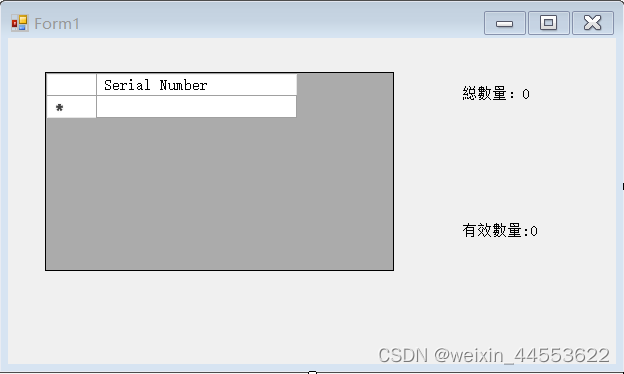部分代码引用源文连接:[源文链接,如有侵权请联系删除(https://blog.csdn.net/baidu_19356259/article/details/121998523)
总结
以上是生活随笔为你收集整理的C#获取扫码枪扫描数据并处理的全部内容,希望文章能够帮你解决所遇到的问题。

- 上一篇: androidx.preference.
- 下一篇: C# 如何将Excel表格复制到Word